Back to best software guidesERP deployment choices for Malaysian SMEs

Cloud ERP vs Traditional ERP

Cloud SaaS moves platform operation to a provider; on-premises ERP gives your business more responsibility for its installation. This guide uses traditional to mean on-premises, including modern systems. Compare the actual scope, support owners and a complete business transaction before choosing. A working on-premises system may still be the right fit.

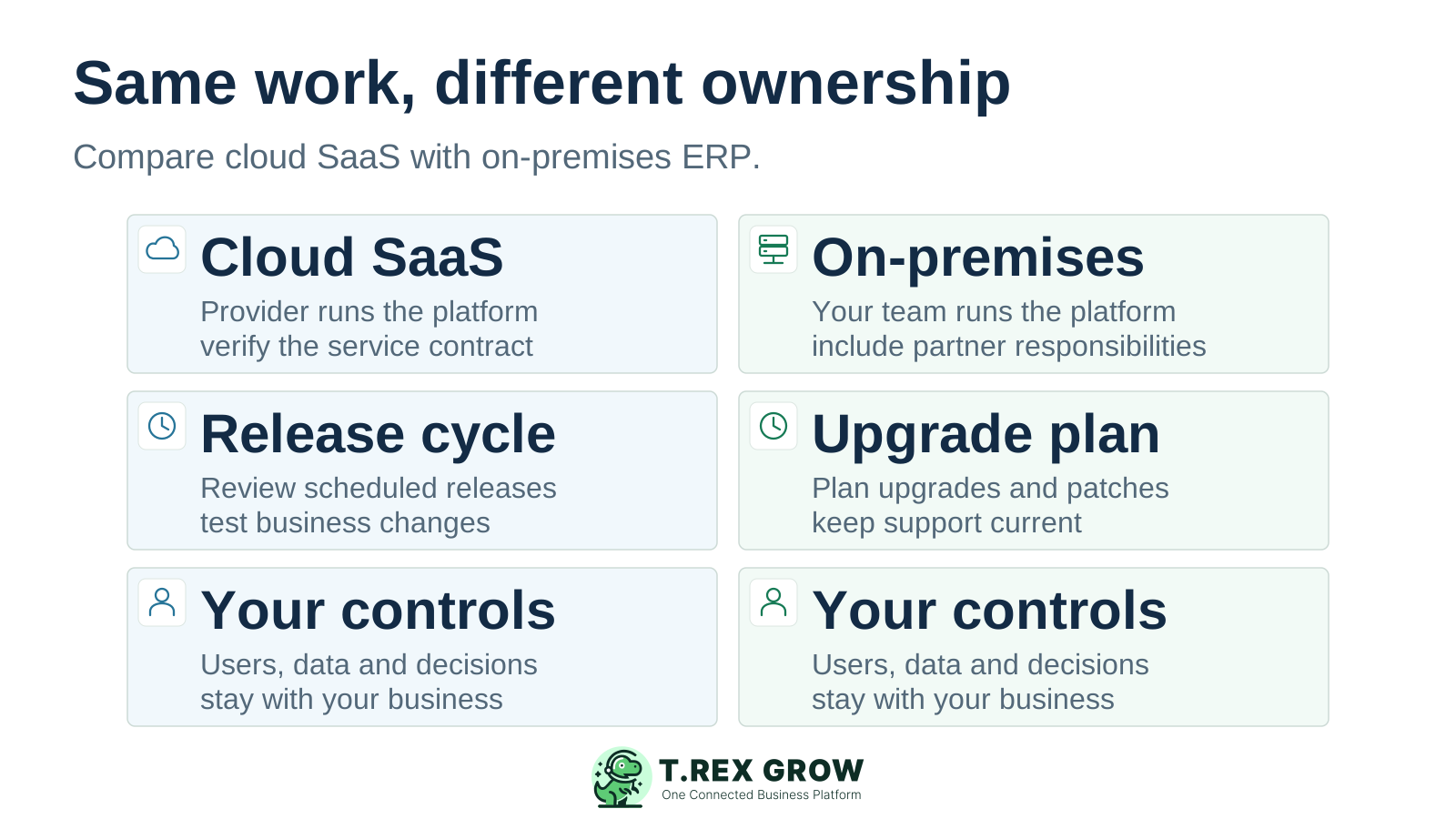
Equal cloud SaaS and on-premises ERP columns compare platform maintenance, release planning and the business controls retained by the team
Education

Who this comparison is for—and what the terms mean

Use this comparison when choosing a new ERP deployment or deciding whether to retain, improve or replace an existing installation. Name the service model first: a browser screen or the word cloud cannot establish who maintains the application.

Cloud SaaS ERP

You use the provider’s application as a service. The provider operates the underlying platform; the offered configuration, updates, support and service commitments must be checked for that product. Your team still manages its business records and authorised users.

Traditional or on-premises ERP

The application runs in an installation controlled by your business. Internal staff or contracted partners handle the assigned infrastructure and application tasks. On-premises describes deployment; it does not mean the software is old or incapable of modern workflows.

Hosted, private-cloud and hybrid offers

Running an existing ERP on rented cloud infrastructure is different from adopting SaaS. Application, operating-system or upgrade work may remain with your team or partner. A hybrid arrangement keeps some functions in each environment. Ask for the exact scope and responsibility split.

Education

Evaluate the work and the people who will own it

Write the same requirements for each proposal. A deployment choice only helps if the required documents, controls and reports work, and the team can sustain its share of the service responsibilities.

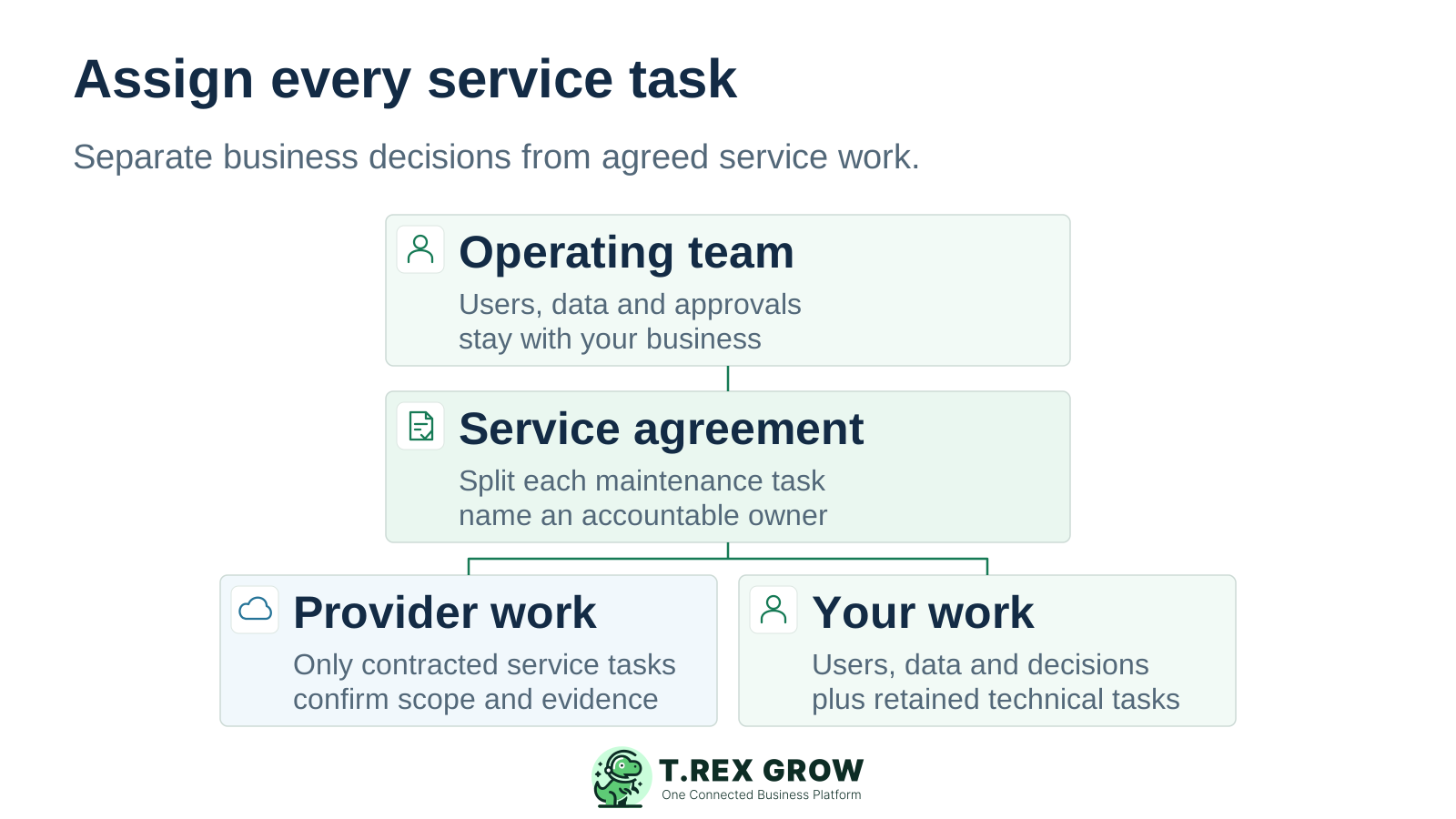
An operating team and service agreement divide responsibilities into contracted provider work and the business tasks and technical work retained by the customer

Business acceptance

List the sales, purchasing, stock and accounting cases that matter. Include partial receipts, invoice adjustments, permissions and reports. Require the exact product edition and plan to demonstrate them.

Maintenance ownership

Name the accountable owner for each patch, upgrade, integration and support task. Separate provider commitments from the work retained by the business. A managed service can delegate work; the agreement should make the boundary clear.

Access and continuity

Test the locations, devices and network conditions your staff will use. Define what happens if the connection, server or application is unavailable. Ask what work can continue and how entries will be reconciled after recovery.

Data and exit requirements

Specify the records, attachments and history you need to retain or take elsewhere. Request a sample export and its format, coverage, fees and timing. Access to a report or a database alone does not demonstrate a usable handover.

Mistakes

Buying mistakes that distort the comparison

Compare the actual offer and its evidence. Claims about every cloud system or every on-premises system can hide the differences that determine day-to-day fit.

Recurring issues usually point to workflow-control gaps, not one isolated data-entry mistake.

Common

Treating hosted ERP as fully managed SaaS

A rented server changes the infrastructure arrangement. It does not automatically transfer application maintenance, backups or upgrade testing. Ask who performs each task and what is included.

High risk

Assuming a lower first payment means lower total cost

Use the same comparison period and workflow scope. Include setup, licences or subscription, support, migration, custom work and ongoing staff effort. Get a current written quotation rather than applying a generic savings percentage.

Common

Assuming deployment guarantees security or compliance

The cloud label and the server’s location cannot establish access controls, data handling or recovery. Review the exact service commitments and the responsibilities your team retains. Malaysia e-Invoice capability must be demonstrated for the relevant documents and setup.

High risk

Replacing a working process before acceptance

Keep the current system available until the new workflow, reports and opening records pass the agreed review. Retaining or improving an accepted installation is a valid option when replacement does not resolve a material gap.

Education

Cloud ERP vs traditional ERP: a practical comparison

The cloud column below refers to SaaS. Hosted ERP on IaaS, managed private-cloud offers and hybrid systems can have different boundaries. These are qualified deployment patterns and buyer questions, not product ratings or measured cost and performance results.

Compare the same requirement in the written offer

Decision areaCloud SaaS ERPOn-premises ERPEvidence to request
Platform maintenanceProvider operates the underlying service; check what application support is included.Business or contracted partner operates the assigned installation and maintenance tasks.Named owners, covered tasks and the support escalation route.
Updates and changesProvider release arrangements shape update timing; review configuration and integration impacts.Your team or partner plans application and infrastructure upgrades within the supported lifecycle.Release notice, test process and responsibility for custom changes.
Access and connectivityService access normally relies on a working network connection; offline features are product-specific.Local operation may be possible if the required components remain available; remote access needs an appropriate setup.Demonstration from each site and a documented outage procedure.
Cost scopeSubscription is one line; implementation, integrations and additional services can add costs.Licence or subscription, equipment and support depend on the offer; include refresh and internal work.The same period, users, modules, rollout tasks and exit assumptions.
Configuration and custom workUse the product’s supported configuration and extension routes; check their limits and maintenance.Installation control can allow more direct changes, subject to the product, licence and support terms.A demonstration of each required change and a named upgrade maintainer.
Security responsibilitiesProvider and customer tasks differ; the business still controls its users, settings and data decisions.The business owns a wider technical boundary unless specific tasks are delegated.Access evidence, responsibility schedule and incident/support contacts.
Recovery and data returnCheck contracted recovery, retention and export arrangements; do not infer them from the cloud label.Plan and test the installation’s recovery and data handover with the responsible team.Relevant recovery evidence and a usable export of required records and attachments.
Functional fitThe edition and plan determine workflows; hosting does not prove accounting, stock or approval fit.The edition and configuration determine workflows; on-premises does not mean fewer features.The same complete transaction, exceptions and reconciled outputs.
Solution

Where TREX Grow fits in this decision

TREX Grow is a candidate for connected SME operating work across sales documents, purchasing, stock and related records. Evaluate the plan that covers your actual case. If a broader ERP or accepted accounting process already meets the requirements, compare the benefit of a change with its effort and disruption.

Operations work better when records and next actions are connected

Test a connected operating workflow

Demonstrate a quotation through its relevant sales documents, or a purchase order through receipt and supplier billing. Check the source references, responsible users and resulting records on the selected plan.

Choose the required module scope

Free covers core sales and supported e-Invoice work. Starter extends sales documents; Essential adds purchasing and stock; Premium adds deeper warehouse controls. Check current plan details before designing the pilot.

TREX Grow Operations Hub

Retain accountant acceptance

TREX Grow Accounting is Beta. Calculations, postings and reports may be incomplete or inaccurate. Have a qualified accountant review the required outputs before replacing an accepted financial process.

Confirm the service requirements

Ask about any required offline operation, hosting location, recovery commitments, exports or integration routes. This page has not established those commitments or a customer-managed on-premises TREX Grow offer. Verify them against your written requirements.

Education

Product proof: a TREX Grow demo operating view

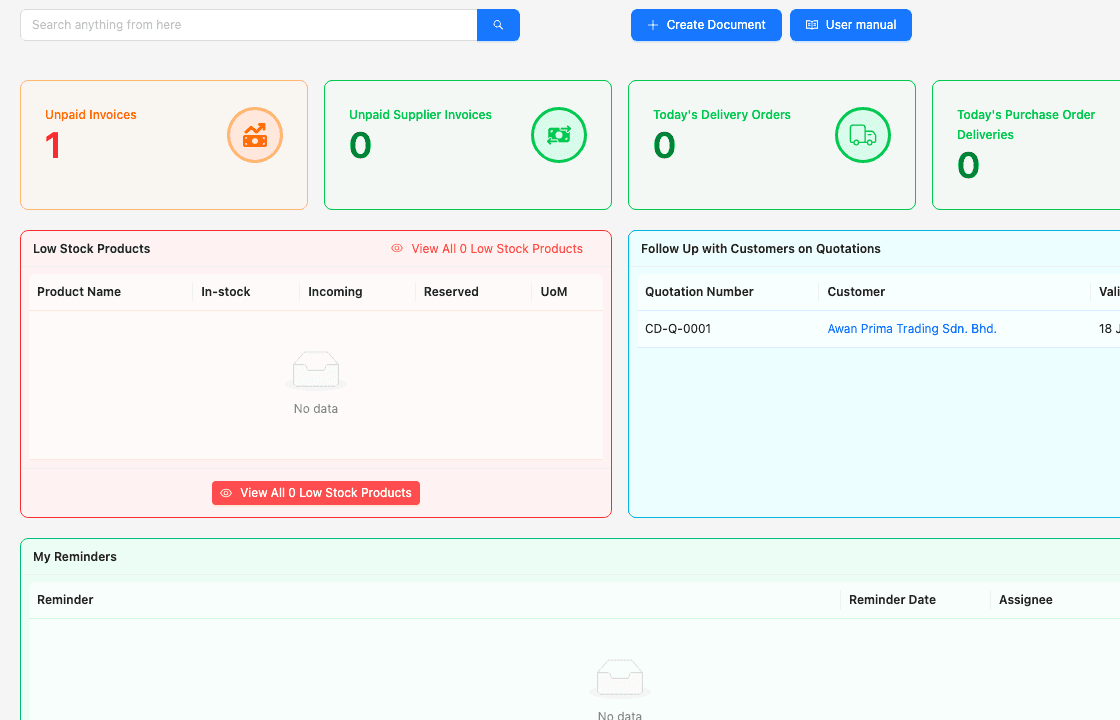
This existing demo screenshot shows invoice attention, delivery activity, low-stock review, quotation follow-up and reminders. It demonstrates visible operating views. The demo numbers are not customer outcomes, and the screen does not establish hosting, recovery, offline operation or security commitments.

Existing TREX Grow demo dashboard showing invoice attention, delivery activity, low-stock review, quotation follow-up and reminders

Inspect the underlying records

Open the relevant invoice, delivery or purchase record during the pilot. Confirm its source, status and the action a user can take rather than accepting a dashboard number alone.

Give each role a realistic task

Let sales, purchasing, warehouse and finance test the work they own. Check relevant permissions and the handover between roles on the required plan.

Compare the same business case

Use equivalent data and acceptance criteria in the other proposed ERP setup. A polished demo in either deployment is useful only when its records and exceptions meet the requirement.

Education

Price the complete scope and the rollout work

Compare current written offers over the same period. Subscription and licence models vary by product and contract. Use this checklist to expose missing scope; it is not a claim that one deployment always costs less or launches faster.

Match a TREX Grow pilot to the plan

Use the current pricing page to confirm which modules are included and the applicable paid-plan trial conditions. Include the team’s setup and review effort; trial access does not remove implementation work.

Separate deployment effort from business readiness

A service can be available before the data, permissions and operating process are ready. Agree a bounded cutover with reconciled opening records and named owners. Do not set the rollout date from a generic vendor timeline.

Cost and implementation questions for either proposal

AreaInclude in the comparisonConfirm with the owner
Product and serviceRequired users, modules, billing term, support and any usage or storage charges.Currency, renewals, exclusions and the exact quoted edition.
ImplementationConfiguration, master-data cleanup, migration, training and accountant review.Who performs the work and what defines acceptance.
Infrastructure and continuityAny retained equipment, connectivity, support and recovery work.Which costs are included in the service and which remain with the business.
Changes and integrationsCustom reports, interfaces, testing and maintenance after updates.Supported route, estimated work and ongoing maintainer.
Cutover and exitParallel review, historical access, reconciliation and required data return.Record coverage, attachment handling, fees and timing.
Best practices

Request evidence for control, continuity and data access

For each proposal, record what is documented, what has been demonstrated and what remains unresolved. Hosting descriptions and product screenshots do not replace evidence for the service requirements your business needs.

Do this

Access and change control

Ask how users are added, removed and restricted, and how significant changes are reviewed. Test the required roles in the proposed configuration.

Do this

Maintenance and support

Request the responsibility schedule and support route. Confirm who handles a failed integration or an update that affects a critical transaction.

Do this

Recovery and retention

Ask what recovery commitments apply, what records are retained and how restoration is requested or tested. State the amount of interruption and data loss the business can tolerate.

Do this

Hosting and data handling

Where location or data-processing arrangements matter, request the current written terms for the actual service. Do not infer a hosting region or certification from a vendor’s website address.

Do this

Exit and historical access

Inspect a sample data return against the records and attachments you need. Agree what stays accessible after termination and who validates the handover.

The best practice is to make the next action clear before the situation becomes urgent.

Workflow

Use one transaction to make the decision concrete

For a trading SME, a useful pilot is a purchase order for 20 units, a receipt of 12, a supplier invoice and its payment record. Confirm the remaining eight and explain the records with the relevant users. This is an acceptance scenario, not a claim that every product completes it identically.

A repeatable operating workflow

Capture

Record the current facts in one shared place.

Check

Confirm what is known and what needs attention.

Assign

Make the next decision or follow-up accountable.

Act

Complete the next task and record the outcome.

Review

Refresh the shared view when facts change.

A dependable workflow keeps the shared record and the next action aligned.

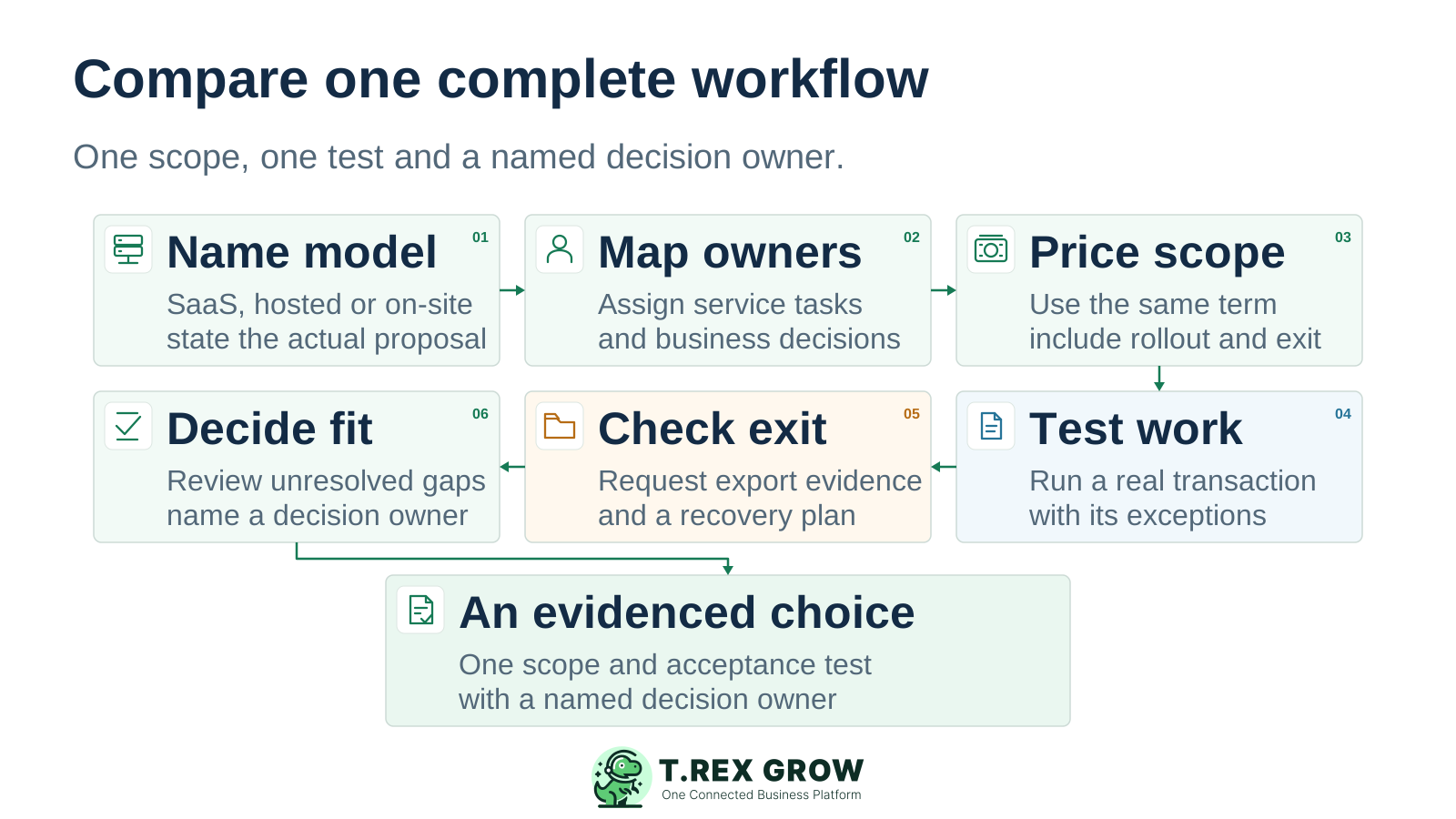
Six buyer review steps identify the deployment model, assign owners, price scope, test a transaction, check data-return evidence and decide on fit
1

Name the model. Record the exact product, edition, plan and whether the offer is SaaS, hosted ERP, on-premises or hybrid.

2

Map the owners. Assign maintenance, support, data, access and process responsibilities to named people or contracted providers.

3

Price the same scope. Use the same comparison period, users, modules, implementation work and ongoing obligations in each written offer.

4

Test the work. Run the complete transaction and its partial-receipt or adjustment cases. Reconcile the relevant document, stock and financial outputs with the responsible users.

5

Check continuity and exit. Review the required recovery commitments and sample exports. Record any service or data-return requirement still awaiting evidence.

6

Decide on fit. Compare passed requirements, unresolved gaps, support capacity and total scope. Name the decision owner and retain, improve or replace the current system accordingly.

Next step

Test the workflow on the plan you would use

Bring one complete sales or purchasing case, the users who own it and a short acceptance checklist. If TREX Grow matches the operating scope, use the relevant paid-plan trial to inspect the records and handovers before committing.

Explore the TREX Grow Paid-Plan Trial

It means on-premises ERP: an installation controlled by the business, with technical tasks handled internally or by contracted partners. It includes modern systems. The comparison is about deployment and responsibility, not whether a product is old or capable.