One sheet supports one clear job
A small, stable tracker with a named owner, consistent fields and regular checks may remain practical. Migration should solve a real operating problem, not remove a useful tool by default.

Excel, Google Sheets and other spreadsheets can remain excellent tools for planning, analysis and controlled low-volume tracking. TREX Grow becomes relevant when customer, product, document, stock and follow-up records need one supported operating path. Compare the jobs first, then choose the system for each one.
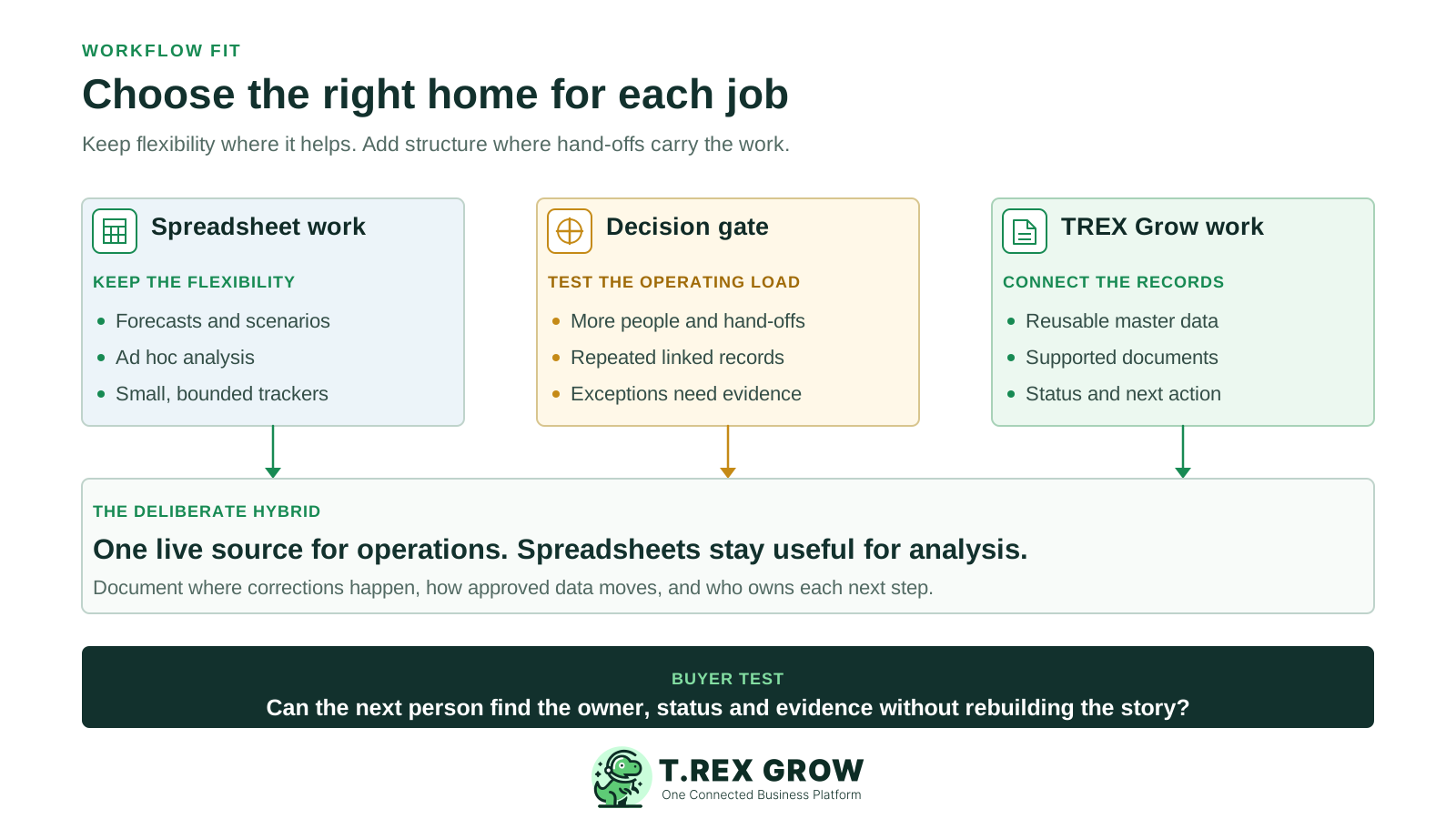
This page is for teams whose daily work is spread across Excel workbooks, Google Sheets, exported CSV files or department trackers. It compares that broader operating model with TREX Grow. The separate TREX Grow versus Excel page examines Microsoft Excel features and setup in more detail.
A small, stable tracker with a named owner, consistent fields and regular checks may remain practical. Migration should solve a real operating problem, not remove a useful tool by default.
The comparison matters when customer details, quotations, invoices, payments, purchase orders or stock movements have to be matched across files and teams.
TREX Grow can own supported live records while spreadsheets remain available for forecasts, ad hoc analysis, planning and accepted reporting work.
Spreadsheets are not automatically single-user or uncontrolled. Capabilities vary by product, licence and configuration, so compare the setup your team actually maintains.
Microsoft documents coauthoring and version history for supported Excel and cloud-storage setups. Google Sheets documents version history and cell edit history, with some changes excluded from the cell view.
Dropdowns, data validation, protected sheets and protected ranges can improve consistency. Google notes that protected ranges are not a security measure, and effective controls still depend on sharing and permissions.
Formulas, pivots, queries and custom layouts make spreadsheets useful for analysis, forecasting and exceptions that do not justify a permanent application workflow.
Scripts, add-ons and connected tools can extend a spreadsheet. Count their design, testing, access, maintenance and support when comparing the complete working setup.
The key question is where a spreadsheet stops being a useful tool and starts acting as an unofficial operating system. Mark the boundary around live records, business decisions and the next action each employee must take.
Ask whether customer, supplier and product identifiers are defined once or repeatedly typed into unrelated sheets.
Follow one quotation into an invoice and one purchase order into receiving, supplier billing and stock. Record every copy, lookup and manual reconciliation.
Identify where approvals, attachments, corrections, permissions and returned statuses live, and whether the next employee can find them without asking the author.
A useful comparison does not force every job into one tool or compare a polished product workflow with a neglected sheet. Test the maintained setup on each side.
Recurring issues usually point to workflow-control gaps, not one isolated data-entry mistake.
Shared editing and version history are valuable, but the team must still define the approved state, next action and owner for each business record.
Include workbook design, connected tools, maintenance, reconciliation, training and exceptions alongside the TREX Grow plan, setup and migration effort.
Forecasts and custom models can remain in spreadsheets. Establish how approved operational data reaches them and where corrections belong.
Totals do not preserve source documents, versions, attachments, status, approvals or open actions. Reconcile a representative transaction trail.
The spreadsheet column describes a well-managed category, not every file. TREX Grow scope depends on the selected plan. Validate both options with your own volume, documents, users and exception cases.
| Requirement | Spreadsheet-led setup | TREX Grow | Buyer test |
|---|---|---|---|
| Planning and analysis | Highly flexible formulas, models, pivots and layouts suit forecasts, scenario work and ad hoc analysis. | Operational views follow supported records and modules; spreadsheets may remain the better companion for custom modelling. | List the analysis that must stay flexible and the live data that needs an accountable owner. |
| Master data | Teams can maintain controlled customer, supplier and product tables, but each dependent sheet must use and refresh them consistently. | Reusable customer, product and supported supplier records feed the documents available in the chosen plan. | Change one address or product code and trace every place where staff must update or verify it. |
| Sales documents | Templates can create quotations and invoices; the team defines numbering, revision rules, storage and follow-up. | Free includes quotations and invoices; Starter adds the complete sales-document set, attachments and multi-currency. | Revise a quotation, issue the next document and find the agreed version and outstanding action. |
| Purchasing and stock | Linked tables can calculate ordered, received and remaining quantities when the workbook design and updates stay correct. | Essential adds purchase orders, stock entries, supplier invoices, returns and core inventory work; Premium adds warehouse depth. | Receive part of a purchase order and explain the remaining quantity, stock effect and supplier document. |
| Status and hand-offs | Status columns, comments, notifications and scripts can coordinate work when conventions and integrations are maintained. | Supported records place status, document context and the next workflow step in one operating workspace. | Ask a colleague who did not create the record to identify its current state and next owner. |
| Malaysia e-Invoice | Spreadsheets can prepare and review source data, while submission, validation and returned status need an accepted portal or software path. | Free includes supported Malaysia e-Invoice submission from invoice records; setup, review and exception handling still need an owner. | Trace source details, submission result, returned status and correction without assuming that a prepared row is a validated e-Invoice. |
| Accounting | Custom calculations and reports require control design and professional acceptance before important reliance. | Accounting is Beta on paid plans; TREX Grow warns that outputs may be incomplete or inaccurate and require qualified-accountant review. | Keep the accepted accounting process until a qualified accountant approves opening balances, postings, reconciliation and reports. |
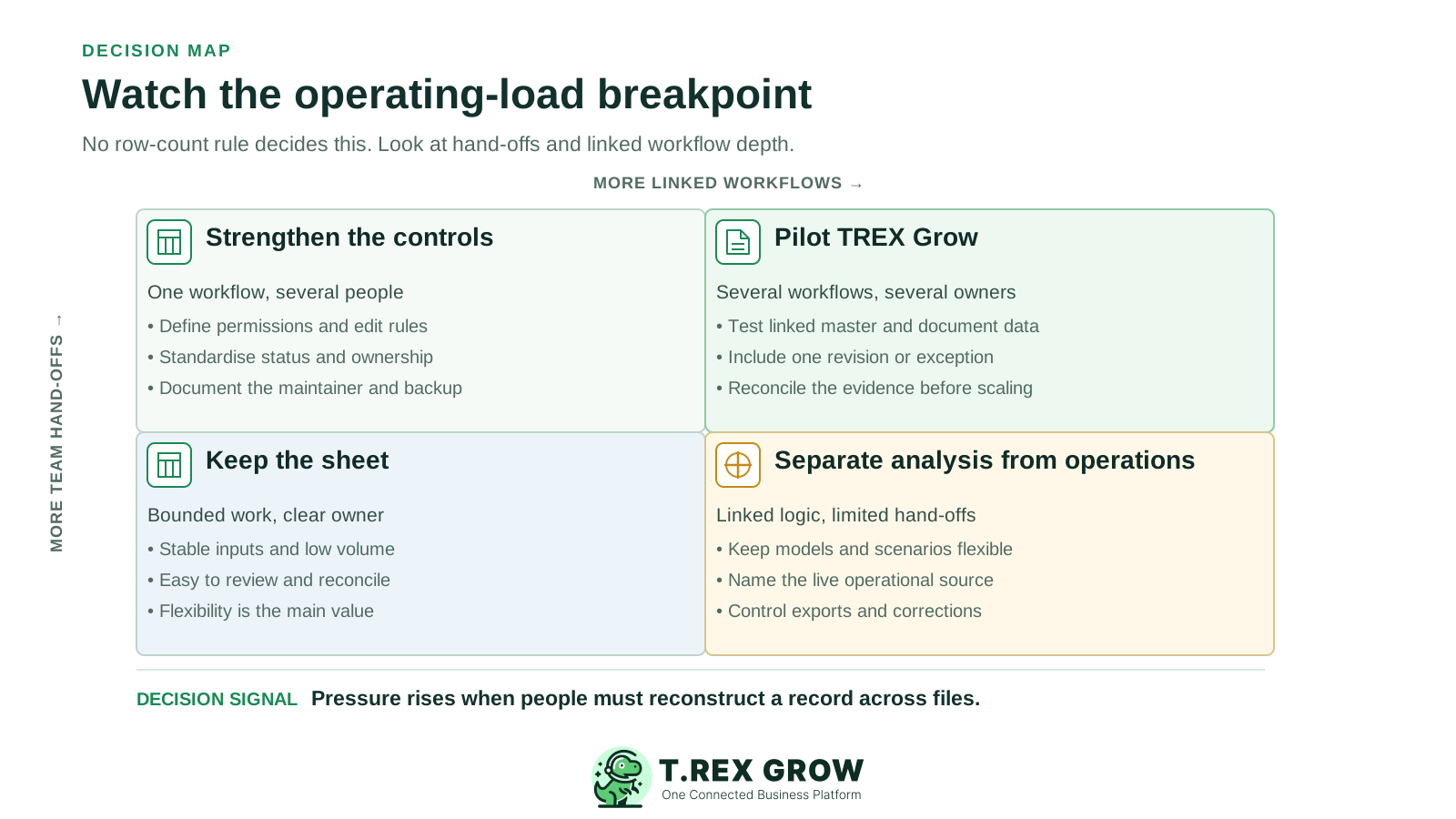
No universal row count makes a spreadsheet unsuitable. Pressure usually rises when more people, more linked workflows and more exceptions depend on the same record. Use these signals to decide whether a focused TREX Grow pilot is justified.
Operational pressure
When records live in different places, the person responsible has to reconstruct what happened before they can make a confident decision or follow up.
Repeated customer names, item codes, prices and document totals create reconciliation work and make corrections harder to propagate.
If a green cell cannot show who approved the record, which version was reviewed or what happens next, the team needs more operating context.
A sophisticated workbook can work well, but the business should count the risk and time tied to the person who understands its formulas, scripts and conventions.
Partial receipts, returns, document revisions, rejected submissions and stock corrections expose weak links between otherwise tidy trackers.
A defensible decision can be spreadsheet-first, TREX Grow-first or deliberately hybrid. Choose per workflow and name the live source of truth.
Stay with a sheet when the job is stable, low volume, owned by one accountable person and easy to reconcile, especially when flexible modelling is the main value.
Standardise IDs, validation, permissions, version rules and ownership when the current pain comes from weak setup rather than the tool category.
Test supported connected records when sales, purchasing, stock, document status and follow-up repeatedly cross people or files.
Let TREX Grow own the supported live operational record and export or reference approved data for spreadsheet analysis. Document which side accepts corrections.
An existing spreadsheet licence can look free because the organisation already pays for it. Compare the whole working setup: software entitlement, design, maintenance, reconciliation, training, migration and the manual steps that remain.
| Area | Spreadsheet question | TREX Grow question |
|---|---|---|
| Existing entitlement | Which desktop, cloud, storage, sharing and automation features are included in the current licences? | Can the team begin on Free, or does the test require Starter, Essential or Premium? |
| Process ownership | Who maintains formulas, validation, scripts, permissions, backups and operating instructions? | Who configures users, master data, supported records and the chosen workflow? |
| Plan boundary | Which connected tools or add-ons are required beyond the sheet itself? | Starter covers broader sales work; Essential adds purchasing and stock; Premium adds advanced warehouse controls. |
| Migration | Which files, histories, attachments, formulas and reports must remain accessible? | Which records can be prepared, imported or re-created, and how will sample totals be reconciled? |
| Ongoing exceptions | How much time goes into duplicate entry, chasing owners and reconciling mismatched trackers? | Which exceptions remain manual after the pilot, and who owns them? |
Do not turn a comparison into a full migration project. Start with safe sample data or one bounded workflow, preserve the originals and expand only after the team can reconcile the result.
Record the current facts in one shared place.
Confirm what is known and what needs attention.
Make the next decision or follow-up accountable.
Complete the next task and record the outcome.
Refresh the shared view when facts change.
A dependable workflow keeps the shared record and the next action aligned.
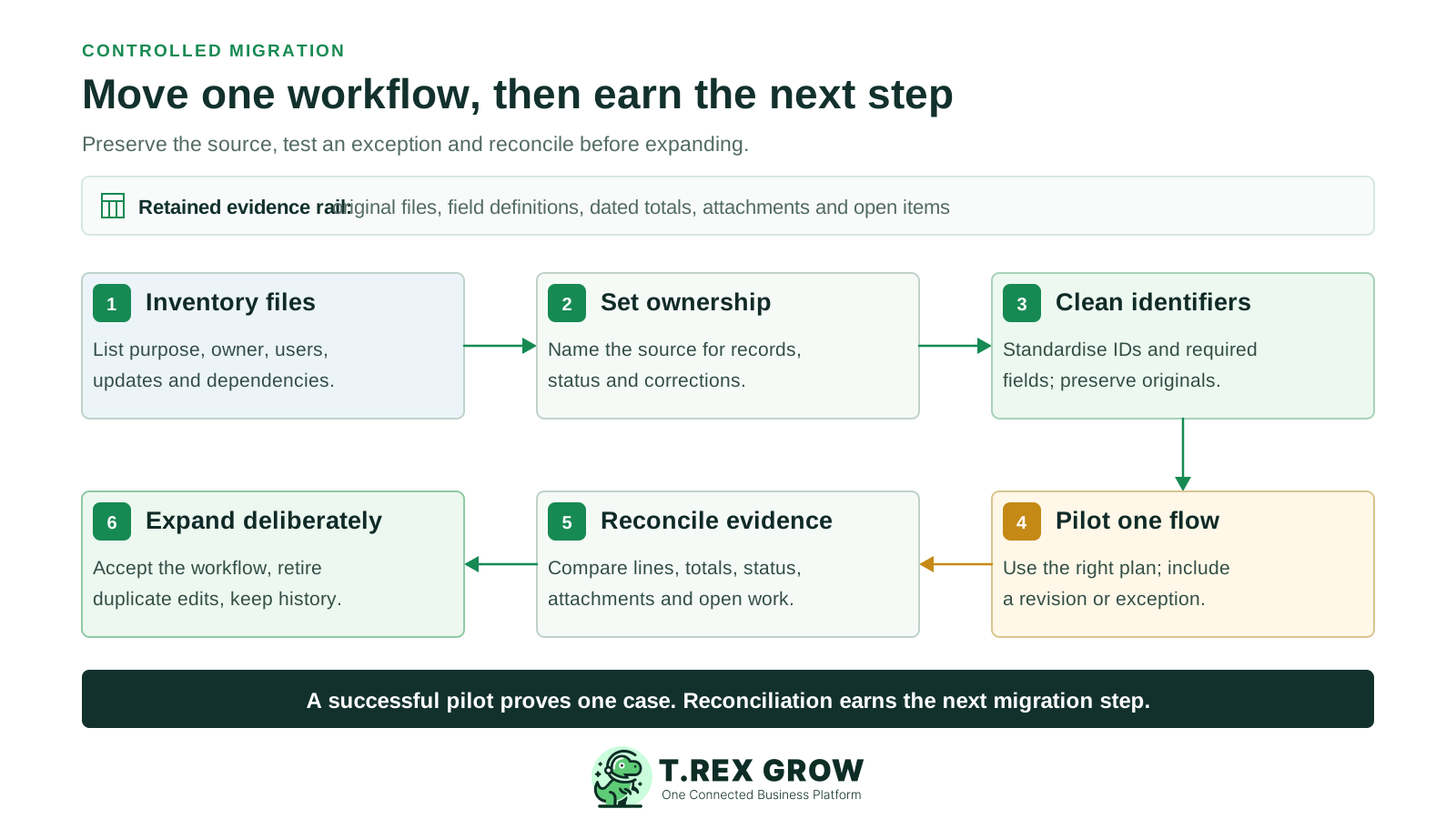
List every spreadsheet, export and shadow tracker used by the selected workflow, with its owner, users, purpose and update frequency.
Choose the future source of truth for customers, products, documents, status and corrections. Name who may create, approve and amend each record.
Clean identifiers and mandatory fields before migration. Preserve original values and document every mapping or exclusion.
Test one representative workflow on the TREX Grow plan that actually includes it, using a normal case plus a revision or exception.
Reconcile line items, totals, quantities, statuses, attachments and open actions against the retained spreadsheet baseline.
Expand only after users accept the workflow. Retire duplicate editing, keep historical files read-only and record any analysis that remains in spreadsheets.
Using both systems is often sensible. The risk comes from allowing both to become editable sources for the same live fact.
State whether customer details, item codes, prices, quantities, document status and payment status are corrected in TREX Grow or in a specified spreadsheet.
Label each spreadsheet extract with its source, date, filters and intended analysis so it is not mistaken for the current operational record.
Use spreadsheet models for analysis where helpful, but document any result that staff must copy back into a live record and who verifies it.
Check which duplicate steps disappeared, which manual controls remain and whether the chosen TREX Grow plan still matches the real workflow.
The best practice is to make the next action clear before the situation becomes urgent.
Choose the spreadsheet workflow that creates the most duplicate entry or status chasing. Keep its useful analysis, test the same case in the smallest suitable TREX Grow plan and compare the records, ownership and work left over.
No. A well-designed spreadsheet can remain efficient for low-volume, bounded work and flexible analysis. TREX Grow is more relevant when supported operational records need to stay connected across people, documents, status and follow-up.